
About This App
CategoryTools
Installs1M+
Content RatingEveryone
Developer Email--
Screenshots

Editor Reviews
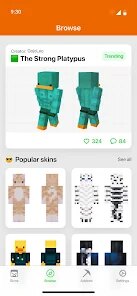
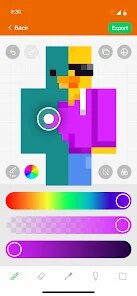
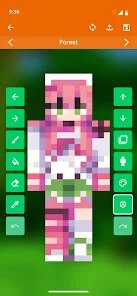
Skin Maker & 3D Editor by Pixelvoid Games Ltd is a standout tool for Minecraft enthusiasts looking to elevate their in-game persona. With over 1 million installs and a solid 4.5-star rating, it is clear that this app has mastered the balance between depth and accessibility. The app provides a robust 3D environment that allows users to view their character models from every angle while applying textures and colors with precision.
What truly makes Skin Maker & 3D Editor shine is its intuitive interface; it removes the technical hurdles usually associated with pixel art, making it approachable for both beginners and experienced creators. Whether you are designing a complex superhero costume or a mythical monster, the diverse palette and pattern tools ensure your character stands out in any server. By streamlining the creative process, Skin Maker & 3D Editor transforms skin creation from a tedious chore into a genuinely fun, artistic experience.
It is an essential utility for any player wanting to personalize their Minecraft journey with unique, high-quality designs that reflect their individual style and imagination.
Features
- 📱 User-Friendly Design: Skin Maker & 3D Editor features an intuitive interface that makes every task simple and straightforward.
- ⚡ Fast & Reliable: Skin Maker & 3D Editor runs smoothly on all devices, providing a seamless and responsive experience.
- 🛠️ Rich Functionality: Access a comprehensive set of tools and features designed to meet your needs in Skin Maker & 3D Editor.
- ✨ Regular Updates: The Skin Maker & 3D Editor team constantly improves the app with new features, bug fixes, and performance enhancements.
- 💡 Easy to Get Started: Get up and running quickly with Skin Maker & 3D Editor's simple setup process and helpful onboarding.
How to Use
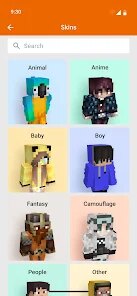
1. Select a Base: Launch Skin Maker & 3D Editor and choose a base character model to begin your design process.
2. Choose Your Tools: Use the intuitive toolbar to select brushes, fill buckets, or color pickers to start customizing your skin.
3. Rotate and Edit: Utilize the 3D viewer to rotate your model, ensuring you can reach every side and corner for a seamless look.
4. Apply Details: Experiment with various patterns and color palettes to add depth, shading, and unique features to your character.
5. Preview Changes: Regularly rotate the model to check how your design looks in a 3D space before finalizing your work.
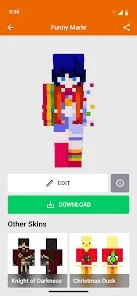
6. Save and Export: Once you are satisfied with your creation, save your skin and export it directly for use in your Minecraft game.
FAQ
Recommended Apps

DoorDash - Food Delivery
★★★★★4.7

AI ARTA: Art & Photo Generator
★★★★★4.2

QR Code Scanner & Scanner App
★★★★★4.4

Temu: Shop Like a Billionaire
★★★★★4.6

KPop Demon Hunter Wallpaper
★★★★★0.0

Customuse: Skins Maker Roblox
★★★★★4.5
Kpop Demon Draw and Coloring
★★★★★0.0

Transit: Bus & Subway Times
★★★★★4.6

Tarot
★★★★★4.8
Imagine : AI Art Generator
★★★★★4.1

Zalo
★★★★★2.3
Zoom Workplace
★★★★★4.1
Photo Editor Picsa: Collage
★★★★★4.6
Prank Sounds: Haircut & Taser
★★★★★4.8

Love Test - Compatibility Test
★★★★★4.5
Hot Apps

Lime - #RideGreen
★★★★★4.9

Kpop Fans Demon Hunter Sticker
★★★★★0.0
Link to Windows
★★★★★3.8
Kpop Fans Demon Hunter Wallpap
★★★★★5.0

Aura Frames
★★★★★4.8

Telegram
★★★★★4.2
Transit: Bus & Subway Times
★★★★★4.6

Affirm: Buy now, pay over time
★★★★★4.8

TikTok
★★★★★4.1
Zoom Workplace
★★★★★4.1

JPay
★★★★★4.0

PayByPhone
★★★★★4.0
Who Love You? Personality Test
★★★★★0.0
KPop Demon Hunter Wallpaper
★★★★★0.0
Customuse: Skins Maker Roblox
★★★★★4.5
Disclaimer
- X-Clash does not represent any developer, nor is it the developer of any app or game.
- X-Clash provides screenshots, historical version APK, links and other information collected from Google Play.
- All trademarks, registered trademarks, product names and company names are the property of their respective owners.
- X-Clash abides by the Digital Millennium Copyright Act (DMCA).
- We provide official download links at Google Play Store and App Store whenever available.
- If you are the owner or copyright representative and want to delete your information, please contact us at [email protected].
- All information on this website strictly observes Google Ads Advertising policies and Google Unwanted Software policy.