About This App
CategoryEntertainment
Installs100,000+
Content Rating--
Developer Email--
Screenshots


Editor Reviews
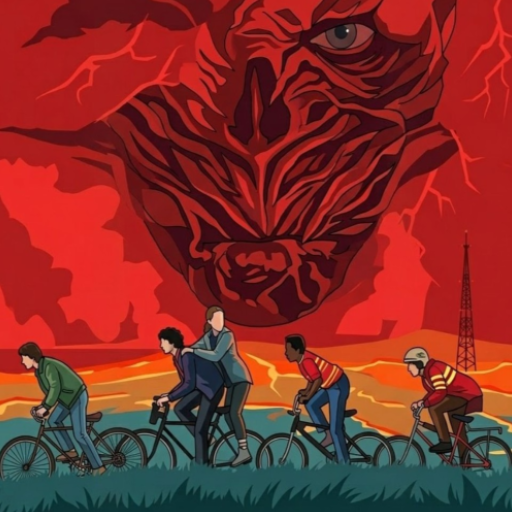
Stranger Things 5 Challenges is a fan-made entertainment app inspired by the Netflix series, designed for fans of Hawkins and the Upside Down. It is not an official Netflix product, but it offers a variety of themed content including logic puzzles, timed reflex mini-games, sticker activities, and fan art tools based on the show's characters and lore. Users can place stickers to recreate Hawkins scenes, draw Upside Down inspired fan art, and browse regularly updated themed images and media.
The app supports a wide range of languages and is freely available on the Play Store. It is best suited as a casual companion app for fans looking for light entertainment between seasons rather than a full gaming experience. 👾🔦
Features
- 📱 User-Friendly Design: Stranger Things 5 Challenges features an intuitive interface that makes every task simple and straightforward.
- ⚡ Fast & Reliable: Stranger Things 5 Challenges runs smoothly on all devices, providing a seamless and responsive experience.
- 🛠️ Rich Functionality: Access a comprehensive set of tools and features designed to meet your needs in Stranger Things 5 Challenges.
- ✨ Regular Updates: The Stranger Things 5 Challenges team constantly improves the app with new features, bug fixes, and performance enhancements.
- 💡 Easy to Get Started: Get up and running quickly with Stranger Things 5 Challenges's simple setup process and helpful onboarding.
How to Use
1. Download and Open: Install the app and open it to reach the main menu, which organizes content into distinct activity categories.
2. Try the Puzzles: Navigate to the puzzle section and select a logic or reflex challenge — these feature Stranger Things themed visuals and increase in difficulty.
3. Play Mini-Games: Access timed reflex rounds and showdown mini-games where you dodge Upside Down creatures and survive supernatural challenges.
4. Use Sticker Play: Open the sticker activity mode, choose your Hawkins-themed stickers, and arrange them on a canvas to create your own scene.
5. Draw Fan Art: Switch to the drawing tool, pick from Upside Down inspired brushes and colors, and create artwork inspired by characters from the show.
6. Browse Themed Media: Scroll the image and reel gallery for freshly updated Stranger Things inspired content and throwbacks.
7. Share Your Creations: Use the share button to export your sticker scenes or fan art to social media or save them to your device gallery.
FAQ
Recommended Apps

Google Chat
★★★★★4.4
SoundHound - Music Discovery
★★★★★3.8

Waze Navigation & Live Traffic
★★★★★4.2

Rumble
★★★★★3.8

Draw Glow Comics
★★★★★4.3

QR Code Scanner & Scanner App
★★★★★4.4

KPop Demon Hunter Wallpaper
★★★★★0.0

TikTok
★★★★★4.1

PayByPhone
★★★★★4.0

Transit: Bus & Subway Times
★★★★★4.6
Kpop Demon Draw and Coloring
★★★★★0.0

Kpop Fans Demon Hunter Sticker
★★★★★0.0
ZEPETO: Avatar, Connect & Play
★★★★★4.3

YouTube
★★★★★3.9

Love Tester Find Real Love App
★★★★★4.6
Hot Apps

TouchTunes: Live Bar JukeBox
★★★★★4.8
TikTok
★★★★★4.1

DoorDash - Food Delivery
★★★★★4.7

Love Test - Compatibility Test
★★★★★4.5
Customuse: Skins Maker Roblox
★★★★★4.5

Walgreens
★★★★★4.6

Kpop Fans Demon Hunter Wallpap
★★★★★4.3

Signal Private Messenger
★★★★★4.5

JPay
★★★★★4.0

Uber - Request a ride
★★★★★4.8

Telegram
★★★★★4.2
Temu: Shop Like a Billionaire
★★★★★4.6
Transit: Bus & Subway Times
★★★★★4.6
PlantSnap plant identification
★★★★★3.7
Zoom Workplace
★★★★★4.1
Disclaimer
- X-Clash does not represent any developer, nor is it the developer of any app or game.
- X-Clash provides screenshots, historical version APK, links and other information collected from Google Play.
- All trademarks, registered trademarks, product names and company names are the property of their respective owners.
- X-Clash abides by the Digital Millennium Copyright Act (DMCA).
- We provide official download links at Google Play Store and App Store whenever available.
- If you are the owner or copyright representative and want to delete your information, please contact us at [email protected].
- All information on this website strictly observes Google Ads Advertising policies and Google Unwanted Software policy.