About This App
CategoryPuzzle
Installs5,000,000+
Content Rating--
Developer Email--
Screenshots


Editor Reviews
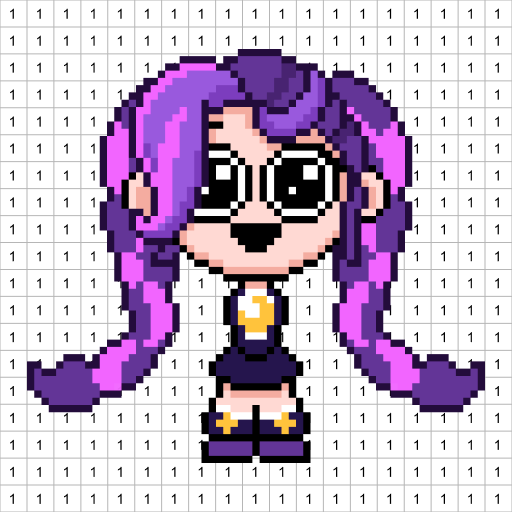
DIY Pixel Art Idea ASMR by NEXCOSMO is a relaxing color-by-number game built around the satisfying tactile loop of tapping numbered grid squares to reveal cheerful pixel art images. Every successful placement triggers a high-fidelity click or pop sound paired with subtle vibration, delivering the ASMR experience that defines the genre. Templates are organized into themed categories — Animals, Food, Landscapes, and Fantasy — and completing one image unlocks access to more.
A freeform coloring mode lets creative players draw on blank canvases using the full palette without any number constraints. The minimalist design philosophy shows in the absence of energy systems, color paywalls, or time pressure, making it a genuinely stress-free mobile experience. Bright cheerful music accompanies each session, and the visual results are surprisingly polished for a mobile pixel art title.
🎨✨
Features
- 🎮 Intuitive Controls: DIY Pixel Art Idea ASMR features smooth, responsive controls optimized for mobile touchscreen gameplay.
- 🎲 Multiple Game Modes: Explore various game modes that keep the gameplay fresh and exciting in DIY Pixel Art Idea ASMR.
- 🚀 Easy to Learn: Jump right into the action with an intuitive tutorial system that gets you playing in minutes.
- 🏅 Competitive Leaderboards: Compare your scores and achievements with friends and players around the world.
- 📱 Offline Play: Enjoy DIY Pixel Art Idea ASMR anytime, anywhere — even without an internet connection.
How to Play
1. Choose a Template — Browse the themed category gallery (Animals, Food, Landscapes, Fantasy) and tap a canvas image you want to complete.
2. Identify the Active Color — The numbered palette at the bottom highlights the currently selected color; tap a number to switch colors.
3. Tap to Fill — Tap each square on the grid that matches the active number to place a colored pixel; ASMR sound and vibration confirm each placement.
4. Zoom In for Precision — Pinch the canvas to zoom into dense areas and pan around to reach all corners without accidental mis-taps.
5. Switch Colors Often — Regularly swap your active palette color to fill different sections efficiently and reduce repetitive scrolling across the canvas.
6. Use Freeform Mode — Tap Freeform Canvas in the menu to paint freely on a blank or lightly sketched grid using any color without number restrictions.
7. Complete and Save — Fill every numbered square to trigger the completion animation, then save the finished artwork to your gallery or share it directly.
FAQ
Recommended Apps

Indian Vehicles Simulator 3d
★★★★★4.4
Frontline Heroes: WW2 Warfare
★★★★★4.4

Snake.io - Fun Snake .io Games
★★★★★4.3

Hill Climb Racing 2
★★★★★4.5

Fish It
★★★★★0.0

Papa's Pancakeria To Go!
★★★★★4.7

Project Makeover
★★★★★4.5

Santa Prank Call: Fake video
★★★★★3.8

MadOut 2: Grand Auto Racing
★★★★★4.1

Black Color Paint By Number
★★★★★4.9

Dream League Soccer 2025
★★★★★4.4
The Room: Old Sins
★★★★★4.9

I Am Monkey
★★★★★4.7
Steal n Catch the Brainrot
★★★★★4.4
The Game of Life 2
★★★★★4.6
Hot Apps

Telegram
★★★★★4.2

KPop Demon Hunters Wallpapers
★★★★★4.7
Revive: Animation & AI Photos
★★★★★4.5

Skin Editor 3D for Minecraft
★★★★★4.4

Zelle®
★★★★★4.1

TikTok
★★★★★4.1

Waze Navigation & Live Traffic
★★★★★4.2
Kpop Fans Demon Hunter Wallpap
★★★★★5.0

Zalo
★★★★★2.3

Love Language Test
★★★★★0.0

Link to Windows
★★★★★3.8

TouchTunes: Live Bar JukeBox
★★★★★4.8
Kpop Demon Draw and Coloring
★★★★★0.0

ParkMobile: Park. Pay. Go.
★★★★★4.7

Uber - Request a ride
★★★★★4.8
Disclaimer
- X-Clash does not represent any developer, nor is it the developer of any app or game.
- X-Clash provides screenshots, historical version APK, links and other information collected from Google Play.
- All trademarks, registered trademarks, product names and company names are the property of their respective owners.
- X-Clash abides by the Digital Millennium Copyright Act (DMCA).
- We provide official download links at Google Play Store and App Store whenever available.
- If you are the owner or copyright representative and want to delete your information, please contact us at [email protected].
- All information on this website strictly observes Google Ads Advertising policies and Google Unwanted Software policy.